


Currency Strength Meter
3.55.00 Reviews
App Specs
- Version
- 1.4.0
- Updated On
- License
- Free
- Downloads
- 10,000+
- Developer
- shubhlaxmi
- Categories
- Finance
- Platform
- Android
Screenshots
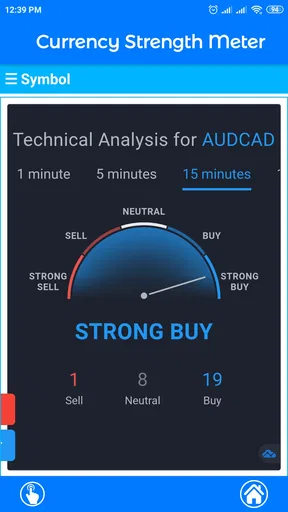
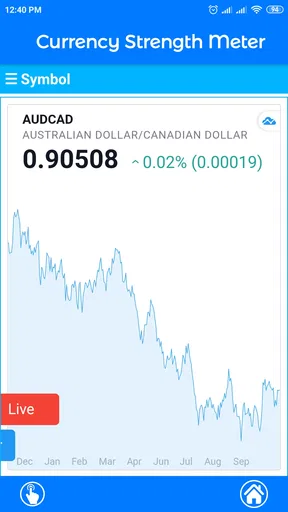
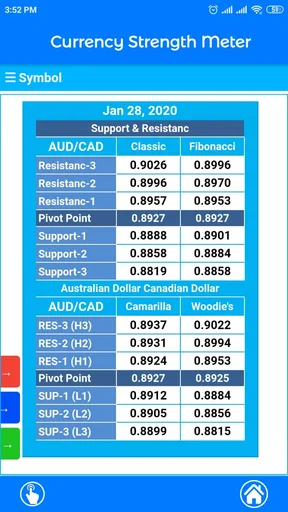
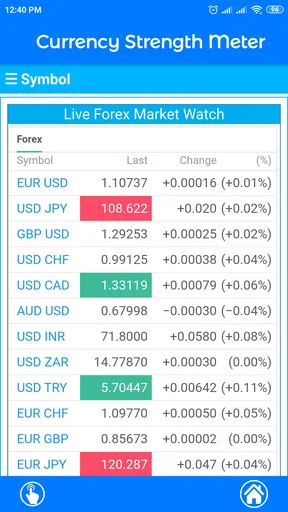
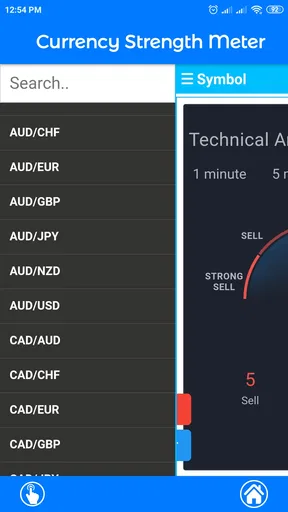
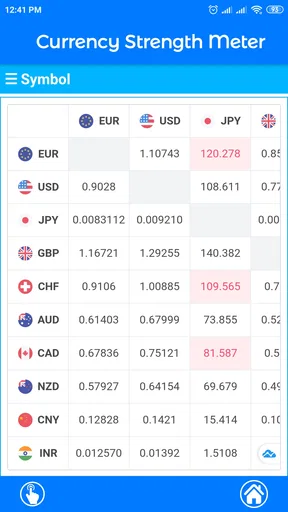
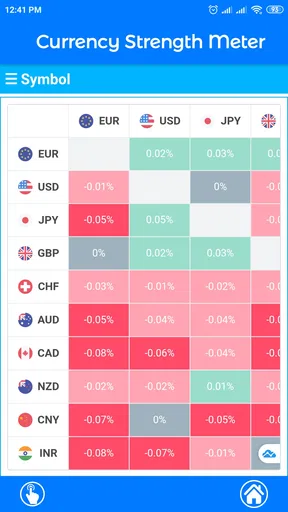
 Analysis by AppCompare
I approached Currency Strength Meter as a practical finance tool rather than a full trading platform. Its purpose is narrow: it helps me compare the relative strength of currency pairs across different timeframes. That focus is useful when I want a quick market overview, but it also defines the app’s limits. It is not a replacement for a broker, a charting suite, or a complete research workspace.
The app is available for free, which makes it easy to test without committing money at the start. It is developed by shubhlaxmi and is rated for Everyone, so its presentation is aimed at a broad audience rather than a specialist professional environment. The current release is version 1.4.0, and it runs on Android devices using version 7.0 or later.
After spending time with it, my impression is that this is best understood as a quick decision-support screen. I would use it before opening a more detailed charting app, especially when I want to identify which currency appears relatively strong or weak over a selected period. I would not use it alone to decide whether to enter a trade.
How the currency-strength view helps in everyday use
I find this view most useful when I treat it as a way to organize attention, not as a prompt to trade immediately. A quick scan can help me decide which pairs deserve a closer look, while keeping a note of the timeframe prevents a short-lived move from taking over the whole picture. That makes the comparison more deliberate and sets up a closer look at what the app’s focused approach means in practice.
A focused starting point for market scanning
The main appeal is the ability to look at currency pair strength through different timeframes instead of judging a pair from one price move alone. That distinction matters. A currency can look strong over a short interval while showing a very different picture over a broader period. Seeing those perspectives together can help me avoid reacting too quickly to one candle or one sudden move.
For example, imagine I am checking the market before work and notice that one currency is strong on a short timeframe but much less convincing on a longer one. I would treat that as a warning against assuming the move is a stable trend. Conversely, when the same direction appears across several timeframes, the reading becomes more interesting as a starting point for further research. The app does not make that judgment for me, but it makes the comparison faster.
This is where the app delivers more value than simply opening a random exchange-rate screen. A normal currency converter answers a different question: how much one currency is worth against another at a given moment. Currency Strength Meter is more useful for asking which side of a pair is currently showing relative momentum or weakness. Those are related ideas, but they are not interchangeable.
Worth Reading Before You Choose

EA SPORTS FC Mobile 26 Is a Bigger Football Game, but It Takes Time

Flipboard Shows What News Apps Must Do Beyond the Feed

Switching to Android Auto Means Rethinking Your Driving Routine

Google Calendar Makes a Crowded Week Easier to Manage

Ludo King Makes the Most of the Minutes Between Plans

Baby Panda World Brings Quick Play to Modern Phones, but Its Game Library Feels Busy
What the app is—and what it is not
I would describe this as a currency strength analysis app, not a trading terminal. The distinction is important for anyone expecting order placement, account management, extensive chart drawing, or a complete news and research feed. Its verified role is to check currency-pair strength across timeframes, so I would keep my expectations aligned with that job.
The app can fit into a workflow that already includes another service. I might use it for the initial scan, then move to a broker or charting application to inspect price structure, spreads, economic events, and risk. That two-step approach is more sensible than treating a strength reading as a complete trade signal.
It is also worth remembering that “strength” is relative. A currency may appear strong because another currency is weaker, not because the first one is improving in every possible sense. That is one of the most important practical lessons when using this type of tool. I would compare the reading with the actual pair chart and the wider market context before acting.
Free access and the question of paid value
The app can be installed without an upfront purchase, so the basic decision is straightforward: try it first and see whether its focused view fits your routine. In-app purchases are listed from $1.99 to $15.99 per item. Those purchase options mean the free entry point does not automatically tell me what every part of the experience costs, so I would check the specific purchase screen before paying for anything.
That distinction is important when judging value. The free availability is useful for experimentation, while the paid range creates a second question: does an added option save enough time or improve the workflow enough to justify spending? I would not pay simply because the app relates to trading. I would pay only if the particular upgrade removes a limitation I encounter repeatedly.
For a casual learner, the free route is probably the sensible starting point. Someone who checks strength readings frequently may find more value in a paid item, but the decision should come from actual use rather than assumptions. Since the listed price range covers separate items rather than one clearly stated universal subscription, I would read each purchase description carefully and avoid treating the highest price as a general cost for the whole app.
Three ways I would use it more intelligently
My first practical tip is to use the app as a filter, not a verdict. I would begin by scanning several currency pairs, note where the readings appear consistent across timeframes, and then verify the most interesting candidates elsewhere. This reduces the temptation to jump into the first pair that looks active.
My second tip is to compare timeframes before comparing pairs. It is easy to find the strongest-looking pair on one screen and overlook the fact that its direction changes completely when the timeframe changes. Looking for agreement first gives me a more disciplined shortlist and helps separate a possible trend from a brief fluctuation.
My third tip is to record the reading before checking the price chart. That small change in order can reveal whether I am using the strength view to form an initial hypothesis or merely looking for confirmation after deciding what I already want to trade. I would write down the currencies that stand out, then inspect the chart and relevant market information without changing the original observation.
A fourth useful habit is to use the app at consistent moments rather than constantly refreshing it. A strength meter can encourage compulsive checking, especially when the numbers or visual signals change. A scheduled review gives the information a purpose: preparing a watchlist, comparing a few pairs, or reviewing whether a previous idea still has support across timeframes.
Where the focused design creates friction
The same simplicity that makes the app approachable can feel limiting for experienced traders. If I need detailed historical analysis, advanced chart tools, alerts, technical indicators, or direct execution, I would have to switch to another application. That is not necessarily a flaw, but it does mean the app adds a step rather than replacing an entire trading setup.
There is also a risk of false confidence. A clean strength reading can look more authoritative than it really is. Without checking how the underlying movement relates to news, volatility, liquidity, and the individual pair’s chart, I could mistake a useful summary for a complete explanation. I see the meter as a lens, not as proof.
The average rating is 3.5 from around 131 ratings, with around 5 written reviews shown alongside it. I read that as a modest signal rather than a decisive recommendation. The install base is over 10K, which suggests that people are trying the app, but neither the rating nor the install count tells me whether it will match my particular trading routine. I would give more weight to whether its timeframe comparison solves a problem I actually have.
How it compares with familiar alternatives
Compared with a currency converter, this app offers a more trading-oriented perspective. A converter is excellent when I need a current exchange calculation for travel, budgeting, or a payment. It is not designed to help me compare relative market strength across timeframes, so it would be the wrong tool for this specific task.
Compared with a full charting platform, Currency Strength Meter is quicker and less demanding when I only want an overview. A charting platform usually gives me much more room for technical investigation, but that depth can slow down a simple scan. If I already know that I will inspect charts afterward, a compact strength view can be a convenient first pass.
Compared with a broker’s built-in tools, the choice depends on workflow. A broker may keep analysis and trading in one place, which is convenient, but a dedicated strength screen can be easier to consult when I want a narrow comparison. I would choose the broker’s tools when execution and account context matter most; I would choose this app when rapid relative-strength screening is the immediate need.
For a beginner, the app may be easier to understand than a crowded charting suite, but simplicity should not be confused with low risk. A new trader still needs to learn what a timeframe means, why relative strength can change, and why a signal must be checked against a broader plan. The app can support that learning process, but it cannot replace it.
Who is likely to get real value from it?
I think the strongest match is a person who follows several currency pairs and wants a fast way to narrow attention. The app is especially practical for someone who finds ordinary charts overwhelming at the beginning of a market review. Instead of opening every pair immediately, I can use the strength comparison to create a smaller list for deeper inspection.
It may also suit a learner who wants to understand the difference between a pair’s movement and a currency’s relative position. By checking more than one timeframe and then comparing the result with a chart, the user can develop a better sense of how short-term and broader movements interact.
It is less suitable for someone who wants an all-in-one trading environment. If my priority is placing orders, managing positions, setting alerts, or conducting detailed technical research without leaving one app, I would choose a more comprehensive platform. This tool is better as a companion than as the center of a complete trading operation.
I would also skip it if I only need exchange-rate conversion for everyday spending. For checking how much a purchase costs in another currency, a converter is more direct. The strength view becomes worthwhile only when I care about comparative market behavior and different time horizons.
Questions I would ask before installing
Will it work on an older Android phone? It requires Android 7.0 or later, so I would check the device software before attempting installation. That requirement is relatively accessible for many Android users, but it still matters if the phone has not been updated for a long time.
Is it suitable for iPhone use? The product information identifies it as an app, but the technical requirement available here is specifically an Android minimum operating system. I would therefore verify platform availability in the relevant store before planning an iOS-based workflow, rather than assuming that an Android listing guarantees an equivalent iPhone version.
Do I need to pay to try it? No upfront price is required to start, while optional in-app purchases range from $1.99 to $15.99 per item. I would install the free version first, test the strength and timeframe views during several normal market checks, and only then decide whether a paid item has practical value.
Can it replace a broker or a charting service? I would not treat it that way. Its useful contribution is the relative-strength overview. For execution, account handling, detailed chart study, and risk decisions, I would continue using the appropriate specialist tools.
Is the age rating a concern? The app is rated Everyone, so its stated content classification is broad and suitable for general audiences. That says something about content suitability, not about the financial risk of acting on market information. Adults and younger users alike should understand that a simple finance interface does not make trading decisions safe.
My verdict on the free and paid choices
My overall view is cautiously positive. Currency Strength Meter has a clear purpose, and I appreciate tools that do one job without pretending to be an entire financial ecosystem. The ability to compare currency-pair strength across different timeframes can save time during an initial market scan and can encourage better questions before I open a trade.
The free access makes the decision low-risk from a purchase perspective: I can test whether the workflow feels useful before spending anything. The in-app purchase range means I would be selective about upgrades and judge each item by the specific benefit it offers. Free access is the reason to experiment; paid value depends on whether the extra option improves a repeated task.
I would recommend trying it to a currency-focused learner or trader who wants a compact screening tool beside a charting or broker app. I would not recommend relying on it as a standalone signal generator, and I would skip it entirely if my needs are limited to conversion or if I require full trade management in one place.
In the end, the app earns its place when it helps me move from a broad market scan to a focused watchlist without replacing careful analysis. If that is the gap in my routine, Currency Strength Meter is worth testing. If I need execution, deep charts, or a complete research environment, another finance app will offer better value, even if this one remains a useful supporting screen.
Pros
- Shows relative currency strength at a glance for faster market analysis.
- Helps identify potentially strong and weak currency pairs.
- Useful for spotting momentum across multiple timeframes.
- Clean visual layout makes comparisons easy to understand.
- Can support trade planning without replacing a full charting platform.
Cons
- Strength readings can change quickly during volatile market conditions.
- Limited value for users unfamiliar with forex indicators.
- Signals may require confirmation from charts and fundamental analysis.
- Some features or data may depend on an internet connection.
- It does not guarantee accurate predictions or profitable trades.
FAQs for Currency Strength Meter
What is Currency Strength Meter and how does it work?
Currency Strength Meter is a financial analysis app designed to show the relative strength of major currencies in the foreign exchange market. It compares currencies using market data and presents the results through visual indicators, rankings, or charts. After reviewing the app, I found it most useful as a quick market overview rather than a standalone system for making trading decisions.
Can Currency Strength Meter be used to make profitable forex trades?
The app can help identify currencies that are currently showing stronger or weaker momentum, but it cannot guarantee profitable trades. Currency strength may change quickly because of economic announcements, market sentiment, and sudden volatility. Users should combine the meter with technical analysis, fundamental research, risk management, and a suitable trading plan before opening any position.
Is Currency Strength Meter suitable for beginners?
Beginners can use Currency Strength Meter to learn how currency pairs are influenced by the relative performance of two currencies. However, some basic knowledge of forex terminology, currency pairs, trends, and volatility is helpful. The app presents useful information, but it may not fully explain why a currency is moving, so new traders should study the market before relying on its readings.
Does Currency Strength Meter provide real-time data?
The usefulness of Currency Strength Meter depends heavily on the data source, update frequency, and features included in the version you install. Some readings may be close to real time, while others can be delayed or based on selected timeframes. Before using the information for active trading, check the app’s data policy, refresh settings, supported markets, and any subscription limitations.
Is Currency Strength Meter free to download and use?
Currency Strength Meter may be available as a free download, but access to all functions can depend on the specific Android or iOS version, advertising model, and optional in-app purchases. Advanced charts, alerts, additional timeframes, or live data may require payment. I recommend checking the store listing carefully and reviewing subscription terms before confirming any purchase.


